Monday, June 27, 2011

Armitage - Network Attack Collaboration

This talk given in May 2011 talks about network attack collaboration. The communication and data sharing problems are touched on, but the real meat of this presentation is Armitage's session sharing capability. If one team member gets access to a host, any other team member can use that session--seamlessly. This talk shows how it works and demonstrates the technology.


Armitage and Metasploit Collaboration Raphael Mudge NoVa Hackers May 2011 from Georgia Weidman on Vimeo.

Thursday, June 23, 2011

Restricted Citrix Excel Application Escapes

SynJunkie has a couple good posts on citrix escapes:

http://synjunkie.blogspot.com/search/label/Citrix

and of course iKat

http://ikat.ha.cked.net/

So recently I had to break out of restricted citrix environment. All I had was Excel 2010 and Word 2010.

I also didnt have a fancy 'jump to url' option when I clicked on the title bar and none of the hot keys were working for me. So goal was to get a web broswer or cmd shell.

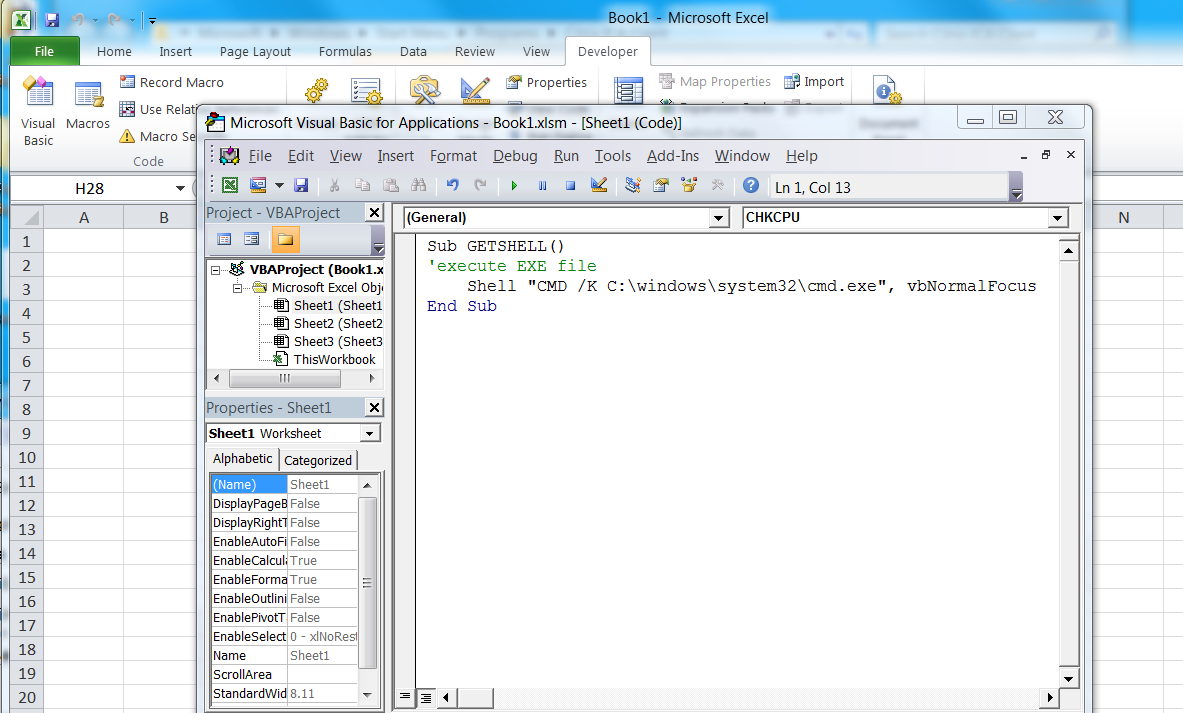
I was able to create macros though. So first I added the developers ribbon.


Click the visual basic button, and paste in some sweet macro code.


Then you save the file as macro enabled workbook.


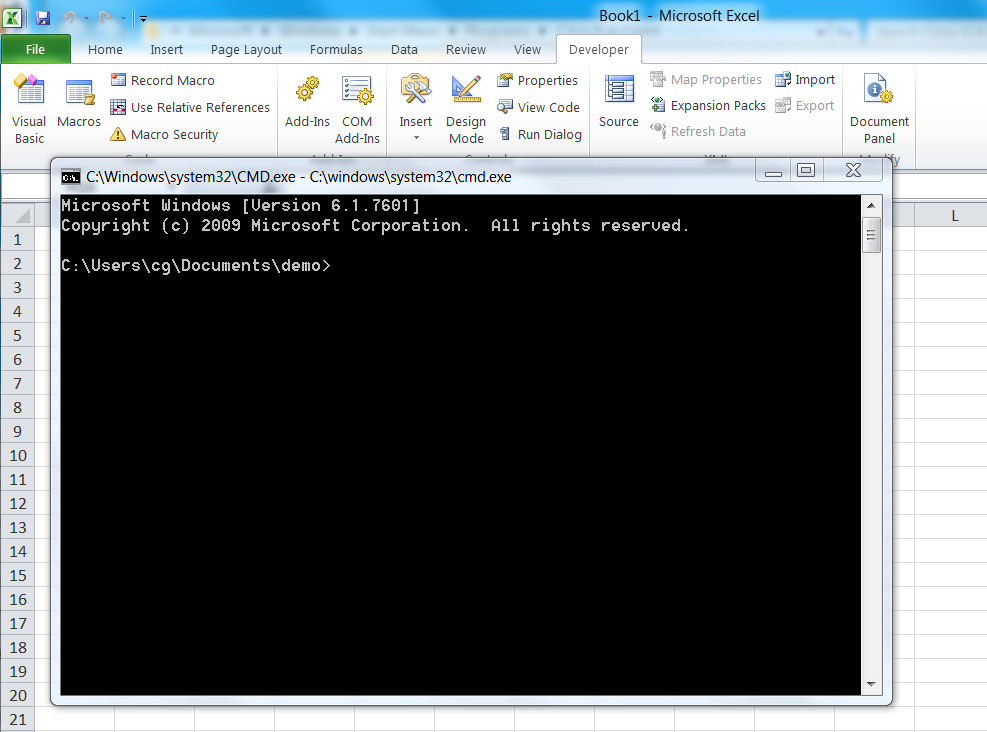
Once its saved, you can hit the macro button and run your macro.


and get shell


The code

Sub GETSHELL()
'execute EXE file
Shell 'CMD /K C:\windows\system32\cmd.exe', vbNormalFocus
End Sub

You could also just type a url into excel...


and click it..But that's pretty low tech and not much fun :-)

Wednesday, June 15, 2011

“volafox” a.k.a “Memory Analyzer for Mac OS X” available

volafox is a python 2.5 application that will analyze images of Macintosh RAM. This utility is free and available from Google Code. Gosh Finally a reliable memory analyzer for Mac. Presence of Mac in the forensics field has increased considerably in the last year. This tool will be a nice addition to the forensicator's belt.

Friday, June 10, 2011

Maliciouse software poses as Microsoft security update

Fake anti-virus attacks have become more sophisticated and professional in their appearance, convincing more innocent computer users into making bad decisions. The use of high quality graphics and professional interfaces means that there is a risk that more users are likely to fall for the scams.

The latest fake anti-virus attack, which tricks users into installing malicious software posing as a Microsoft security update. Affected users will see an almost exact replica of the real Microsoft Update page - the only difference being that the bogus page appears while surfing with Firefox, whereas the genuine Microsoft Update site requires Internet Explorer.

The use of the Microsoft Update disguise takes advantage of the monthly "Patch Tuesday" security updates that Microsoft regularly issues, and that users are encouraged to install to defend their computers.

"Users need to be more vigilant than ever before as bogus security alerts pop-up in their browsers. Fake anti-virus attacks are big business for cybercriminals and they are investing time and effort into making them as convincing as possible," said Graham Cluley, senior technology consultant at Sophos. "Malicious hackers are using smart social engineering tricks more and more often, and the risk is that users will be scared by a phoney warning into handing over money to fix problems that never existed in the first place."

Friday, June 3, 2011

FaceNiff - portable Android cousin of FireSheep

FaceNiff Android App Allows the Clueless to Hack Facebook in Seconds Over Wi-Fi

FaceNiff allows even n00bs to hack Facebook over wifi networks. It works on rooted-Android devices. Other than Facebook, it allows users to sniff Twitter, YouTube, Amazon too. Unlike its older cousin FireSheep, FaceNipp app listens in on wireless networks encrypted with WPA and WPA2. All that is needed is one tap and withing seconds, users can hijack supported account types.

Not that you intend to try out FaceNiff, but you can't hijack more
than three profiles. However, FaceNiff app developer Bartosz
Ponurkiewicz says more sites for hopping onto user accounts will soon be
supported. He noted if you want to hijack more than three profiles with
FaceNiff, there will be an option to pay and unlock the code.


FaceNiff has been confirmed to work on rooted mobile phones: HTC
Desire CM7, original Droid/Milestone CM7, SE Xperia X10, Samsung Galaxy
S, Nexus 1 CM7, HTC HD2, LG Swift 2X, LG Optimus black (original ROM),
LG Optimus 3D (original ROM), and Samsung Infuse.

This App is extremely portable 'cause it runs on Android phones - it presents a clear possible attack vector 'cause it's not just for public wireless
networks. Depending how you manage your wireless network at home,
someone could park outside or walk by your house and FaceNiff you.


This one-tap-wonder app again underscores the importance of using
HTTPS. If you have not done so, you can tweak your Facebook and Twitter
settings to always enable HTTPS. Or use the EFF's Firefox add-on HTTPS Everywhere or another addon of your choosing to force SSL. HTTPS is your friend. It is way past time to start applying major public pressure in order to force sites to use HTTPS.

Wednesday, June 1, 2011

Microsoft Standalone System Sweeper for Offline Scan and Start Unbootable PC

After releasing two free anti-virus tools, Microsoft Safety Scanner and Microsoft Security Essentials, Microsoft has also released a beta version of recovery tool that can help the users to start their infected PC when all other anti-virus solutions failed. The Microsoft recovery tool is called as Microsoft Standalone System Sweeper, which is being designed to reboot the infected PC and perform an offline scan to help identify and remove rootkits as well as other advanced malware. Besides working as a recovery tool, it also can be used when the installed anti-virus solutions can’t be started, and detect or remove malware on the PC. Microsoft Standalone System Sweeper Beta is not a replacement for a full antivirus solution providing ongoing protection; it is meant to be used in situations where you cannot start your PC due to a virus or other malware infection.

You need a blank CD, DVD, or USB drive with at least 250 MB of space, to get started. Next, download and run the tool – the tool will help you to create the bootable media required to run the software on your PC.

The architecture of Microsoft Standalone System Sweeper Beta does not have to be the same as the Windows operating system of the computer used to create the bootable media. It does need to be the same architecture (32-bit or the 64-bit) as the Windows operating system of the computer infected with a virus or malware.

Tuesday, May 31, 2011

Tools

CrossPost from Windows Incident Response blog:

Keydet89 has listed a number of forensic and IR and RE tools.

Memory Analysis
There have been a number of changes recently on the memory analysis front.  For example, Mandiant recently released their RedLine tool, and HBGary released the Community Edition of their Responder product. 

While on the topic of memory analysis tools, let's not forget the erstwhile and formidable Volatility.

Also, if you're performing memory dumps from live systems, be sure to take a look at the MoonSol Windows Memory Toolkit.

SQLite Tools
CCL-Forensics has a trial version of epilog available download, for working with SQLite databases (found on smartphones, etc.).  One of the most noticeable benefits of epilog is that it allows you to recover deleted records, which can be very beneficial for analysts and investigators.

I'm familiar with the SQLite Database Browser...epilog would be interesting to try.

MFT Tools
Sometimes you need a tool to parse the NTFS $MFT file, for a variety of reasons.  A version of my own mft.pl is available online, and Dave Kovar provided his analyzemft.pl tool online, as well.  Mark McKinnon has chimed in and provided MFT parsing tools for Windows, Linux, and MacOSX.

Other Tools
HBGary also made their AcroScrub tool available, which uses WMI to reach across the enterprise and scan for older versions of Adobe Reader.

A very interesting tool that I ran across is Flash Dissector.  If you deal with or even run across SWF files, you might want to take a look at this tool, as well as the companion tools in the SWFRETools set.

The read_open_xml.pl Perl script is still available for parsing metadata from Office 2007 documents.

From the same site as the SWFRETools are some malware write-ups including NiteAim, and Downloader-IstBar.  As a complete aside, here's a very interesting Gh0stNet writeup that Chris pointed me to recently (fans of Ron White refer to him as 'Tater Salad'...fans of Chris Pogue should refer to him as 'Beefcake' or 'Bread Puddin''...).

ADSs
Alternate data streams isn't something that you see discussed much these days.  I recently received a question about a specific ADS, and thought I'd include some tools in this list.  I've used Frank's LADS, as well as Mark's streams.exe.  Scanning for ADSs is part of my malware detection process checklist, particularly when the goal of the analysis is to determine if there's any malware on the system.

Also, I ran across this listing at MS of Known Alternate Stream Names.  This is some very useful information when processing the output of the above tools, because what often happens is that someone uses one of the above tools and finds one of the listed ADSs, and after the panic that ensues, their attitude switches back to the other side of the spectrum, to apathy...and that's when they're most likely to get hit.

Here are some additional resources from Symantec, IronGeek, and MS. Also, be sure to check out what I've written about these in WFA 2/e.


Scanners

Microsoft recently released their Safety Scanner, which is a one-shot micro-scanner...download it, run it, and it expires after 10 days, and then you have to download it again.  This shouldn't replace the use of Security Essentials or other AV tools, but I'm pointing this out because it could be very useful when included as part of your malware detection process.  For example, you could mount an acquired image via FTK Imager or ImDisk and scan the image.  Also, the folks at ForensicArtifacts recently posted on accessing VSCs (their first research link actually goes back to my post by the same title...thanks to AntiForensics for reposting the entire thing...)...without having to have EnCase or PDE, you could easily scan the mounted VSC, as well.


Frameworks
The Digital Forensics Framework (DFF) is open source, and was recently updated to include support for the AFF format, as well as mailbox reconstruction via Joachim Metz's libpff.

Christopher Brown, of TechPathways, has made ProDiscover Basic Edition v6.10.0.2 available, as well.  As a side note, Chris recently tweeted that he's just finished the beta of the full version of ProDiscover, adding the ability to image and diff VSCs.  Wowzers!

Sites
TZWorks - free "prototypes" tools, including the Windows Shellbags parser, an EVTX file parser, and others.  Definitely worth checking out.

WoanWare - several free forensics tools including a couple for browser forensics, and (like TZWorks) a 'USBStor parser'.

NirSoft - the link to the site goes to the forensics tools, but there are a lot of free tools available at the NirSoft site...too many to list.

The Open Source Digital Forensics site is a good source of tools, as well.

OSDFC
Speaking of tools, let's not forget that the OSDFC is right around the corner...

Addendum
Check out Phil Harvey's EXIFTool (comes with a standalone Windows EXE)...there's a long list of supported file types at the tool page.

Additional lists of tools include Mike's Forensic Tools, as well as the tools at MiTeC (thanks to Anonymous' comment).  Also, Mark McKinnon has posted some freely available tools, as well.
"